
| Elapsed time | Variation | Time | Date | Comment | |
|---|---|---|---|---|---|
 |
|||||


eStopwatch.net provides you with a simple and free stopwatch. Stop looking for devices to measure time — your stopwatch is now just one click away!
If you have advanced needs, you can save several measurements while stopping the stopwatch or not. You can add other data including date, time, variation and comments.
Finally, you can export everything and manage the data in your favorite spreadsheet.
Have a great time with your online stopwatch!

Don't hesitate to contact me via email for comments, suggestions, bugs, appreciations... :
Use CTRL+C to copy data to your clipboard, then CTRL+V to paste data to your spreadsheet.
This window summarizes two measures types : gray for split time and black for stopped time.
The cross button delete the line and text field is for comments.
Additional information like date and time are available with the "+/-" button.
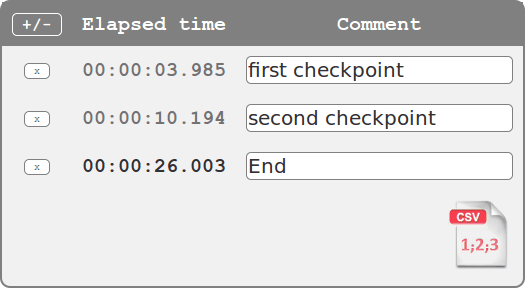
By clicking the CSV icon, you'll obtain a screen export of your data.
Just use CTRL+C to copy data to clipboard. Then you could paste data to your favorite spreadsheet with CTRL+V.
Only the basic metrics are displayed by default. Don't hesitate to activate additional metrics useful for your specific needs.
| Elapsed time | Variation | Time | Date | Comment |
|---|---|---|---|---|
| 00:01:37.249 | 00:00:29.764 | 19:53:01 |
The stopwatch format is customizable. The format choice modifies the stopwatch's precision and limit.
Your session is automatically saved by the online stopwatch, so even if you accidentally close your web browser all information (saved duration and current elapsed time) will be recovered after you restart your browser.
However, if are using several stopwatches at the same time, this feature can be troublesome, which is why you have the option to switch off automatic session saving.